

springboot学习之如何调用RESTful Web服务
2023-04-12






springboot学习之如何调用RESTful Web服务
- 新建工程gs-consuming-rest
- 新建entity
- 完善Application
- 模拟远程服务
- 运行gs-consuming-rest工程
- 学习总结
此文意在学习创建一个工程并调用一个远程服务。
新建工程gs-consuming-rest
新建工程步骤参考:《springboot学习之构建 RESTful Web服务》新建web 工程。
新建entity
public class Greeting {

    private long id;
    private String content;

    public Greeting(long id, String content) {
        this.id = id;
        this.content = content;
    }

    public long getId() {
        return id;
    }

    public void setId(long id) {
        this.id = id;
    }

    public String getContent() {
        return content;
    }

    public void setContent(String content) {
        this.content = content;
    }

    @Override
    public String toString() {
        return "Greeting{" +
                "id=" + id +
                ", content='" + content + '\'' +
                '}';
    }
}
完善Application
@SpringBootApplication
public class ConsumingRestApplication {

    private static final Logger log = LoggerFactory.getLogger(ConsumingRestApplication.class);

    public static void main(String[] args) {
        SpringApplication.run(ConsumingRestApplication.class, args);
    }

    @Bean
    public RestTemplate restTemplate(RestTemplateBuilder builder) {
        return builder.build();
    }

    @Bean
    public CommandLineRunner run(RestTemplate restTemplate) throws Exception {
        return args -> {
            Greeting greeting = restTemplate.getForObject(
                    "http://127.0.0.1:8080/gs-rest-service/greeting", Greeting.class);
            log.info(greeting.toString());
        };
    }

}
CommandLineRunner表示在启动时执行RestTemplate
模拟远程服务
使用gs-rest-service服务实例,该服务提供一个接口:http://127.0.0.1:8080/gs-rest-service/greeting
在浏览器访问两次,第二次返回数据如下:{“id”:2,“content”:“Hello, World!”}
运行gs-consuming-rest工程
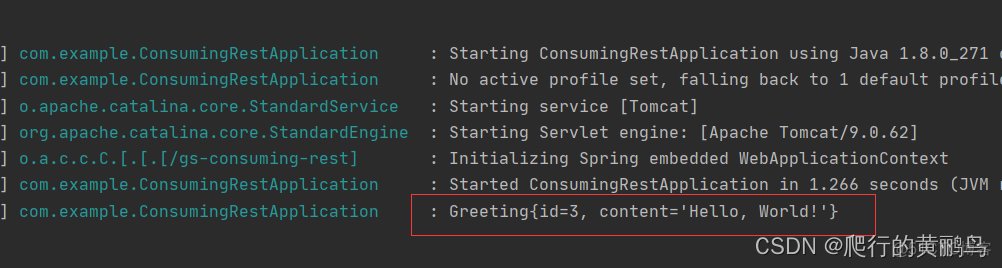
可以看到上图中正常返回数据为:{“id”:3,“content”:“Hello, World!”}
学习总结
主要学习了使用Spring Boot 开发一个简单REST客户端。
本文仅代表作者观点,版权归原创者所有,如需转载请在文中注明来源及作者名字。
免责声明:本文系转载编辑文章,仅作分享之用。如分享内容、图片侵犯到您的版权或非授权发布,请及时与我们联系进行审核处理或删除,您可以发送材料至邮箱:service@tojoy.com