

springboot学习之构建 RESTful Web服务
2023-04-12






springboot学习之构建 RESTful Web服务
- 学习目标
- 学习环境
- 学习内容
- 新建web工程
- 新建实体类
- 新建服务接口
- 运行、测试
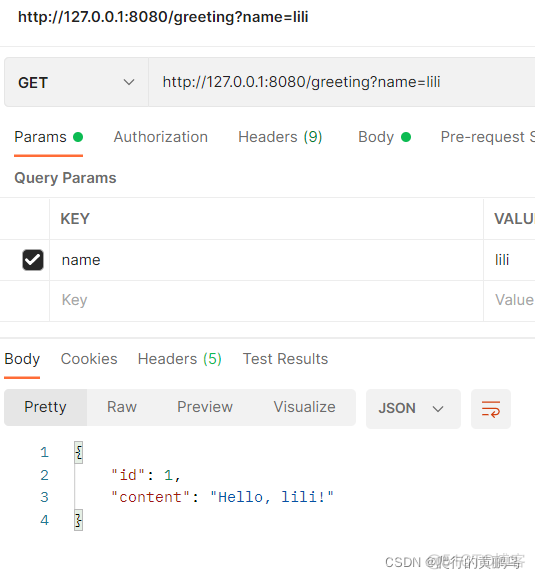
- 携带name参数
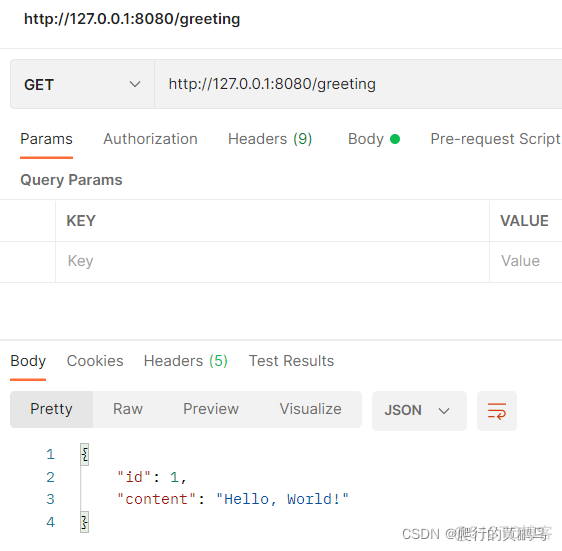
- 无name参数
- 学习总结
学习目标
- 新建一个get请求,服务请求url为http://127.0.0.1:8080/greeting 返回一个应答信息:
{"id":1,"content":"Hello, World!"}- 请求中可以携带参数如下:
http://127.0.0.1:8080/greeting?name=lili- 应答信息中的“World”可以被“王山”覆盖,返回信息如下:
{"id":1,"content":"Hello, lili!"}学习环境
idea
maven3.6.3
jdk1.8
学习内容
新建web工程
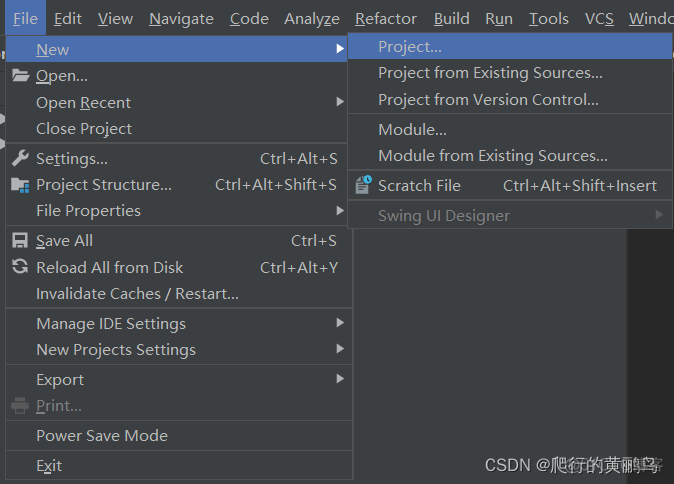
1、File->New->Project……
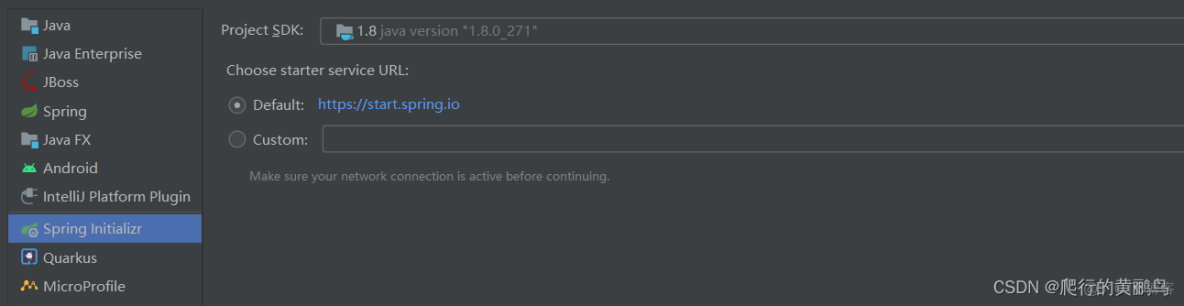
2、点击Next
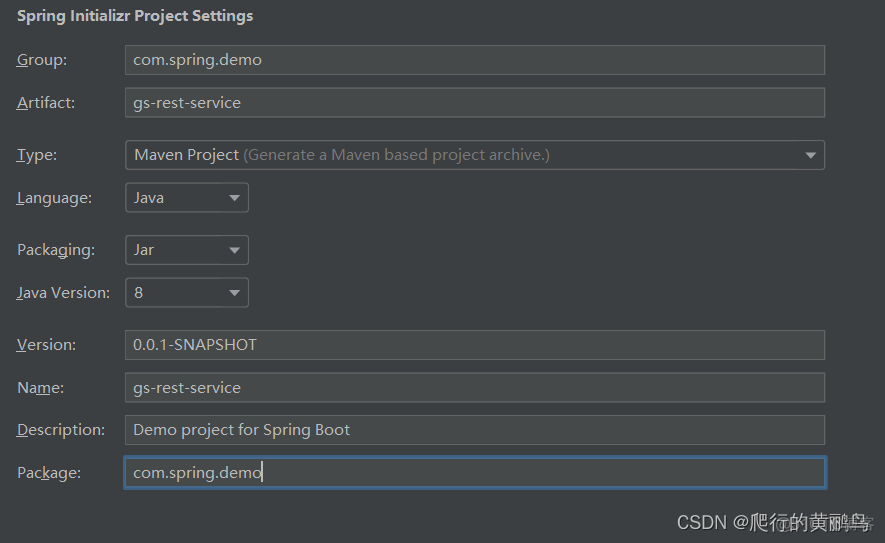
3、配置项目信息,继续Next
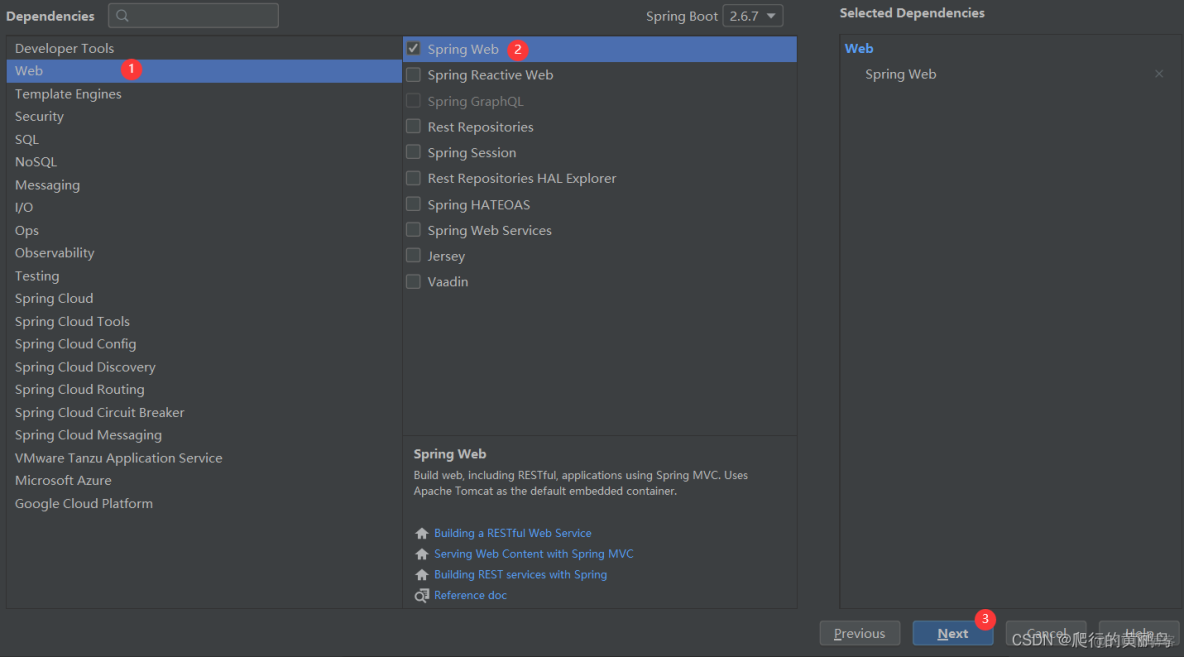
4、选择依赖,继续Next
5、设置项目名称和路径位置,点击Finish

6、工程搭建完毕。
新建实体类
package com.spring.demo.domain;

public class Greeting {

    private long id;
    private String content;

    public Greeting(long id, String content) {
        this.id = id;
        this.content = content;
    }

    public long getId() {
        return id;
    }

    public void setId(long id) {
        this.id = id;
    }

    public String getContent() {
        return content;
    }

    public void setContent(String content) {
        this.content = content;
    }

    @Override
    public String toString() {
        return "Greeting{" +
                "id=" + id +
                ", content='" + content + '\'' +
                '}';
    }
}
新建服务接口
package com.spring.demo.web;

import com.spring.demo.domain.Greeting;
import org.springframework.web.bind.annotation.GetMapping;
import org.springframework.web.bind.annotation.RequestMapping;
import org.springframework.web.bind.annotation.RestController;

@RestController
@RequestMapping("/greeting")
public class GreetingController {

    @GetMapping()
    //@RequestMapping(method=GET)
    public Greeting greeting(String name){
        Greeting greeting = null;
        if (name != null && !"".equals(name)) {
            greeting = new Greeting(1, "Hello, "+name+"!");
        } else {
            greeting = new Greeting(1, "Hello, World!");
        }
        return greeting;
    }
}
运行、测试
携带name参数
无name参数
学习总结
通过自己的实践和官网提供的demo,可做如下总结。
- @RestController表示该类的每个方法都返回一个domain以替代view,它同时包含@Controller和@ResponseBody
- @GetMapping()也可写成@RequestMapping(method=GET)
- 使用@RequestParam进行控制器接口优化:
@RestController
public class GreetingController {

	private static final String template = "Hello, %s!";
	private final AtomicLong counter = new AtomicLong();

	@GetMapping("/greeting")
	public Greeting greeting(@RequestParam(value = "name", defaultValue = "World") String name) {
		return new Greeting(counter.incrementAndGet(), String.format(template, name));
	}
}- @RequestParam将查询参数name的值绑定到greeting方法的name参数上,如果name参数值为空,默认值使用“World”。
- 返回的Greeting转化为json格式的数据,不用我们处理,Spring框架自带的消息转换器
MappingJackson2HttpMessageConverter自动转换Greeting为JSON。 - 官方代码中使用了AtomicLong这个类用来实现主键自增。
- @SpringBootApplication包含了@Configuration、@EnableAutoConfiguration、@ComponentScan。
- main()方法使用SpringApplication.run()方法去运行程序。
本文仅代表作者观点,版权归原创者所有,如需转载请在文中注明来源及作者名字。
免责声明:本文系转载编辑文章,仅作分享之用。如分享内容、图片侵犯到您的版权或非授权发布,请及时与我们联系进行审核处理或删除,您可以发送材料至邮箱:service@tojoy.com