

Python爬虫知识回顾
之前一直沉溺于java,jsp,ssh,db等爬虫,现在又要开始走python的老路了。常用的requests库,通过requests对象的get方法,获取一个response对象。jsp的东西。
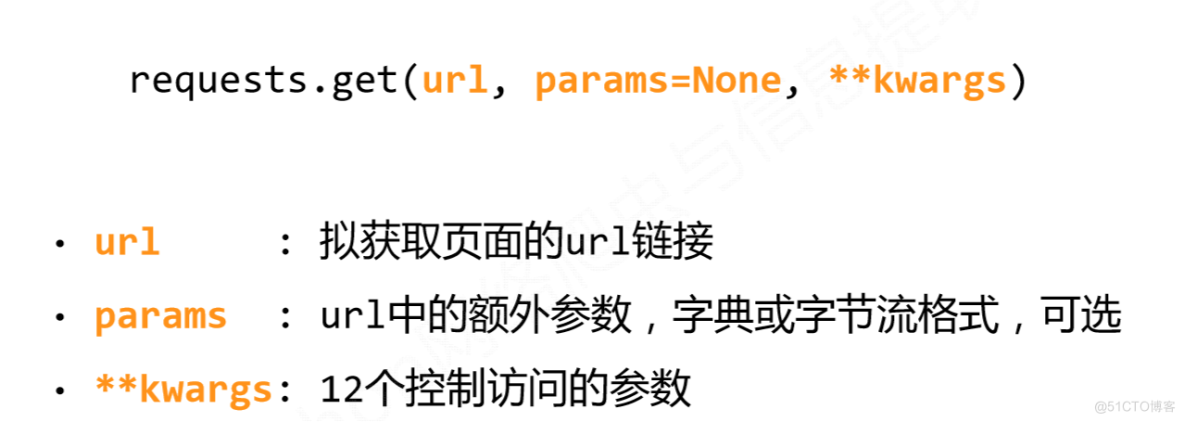
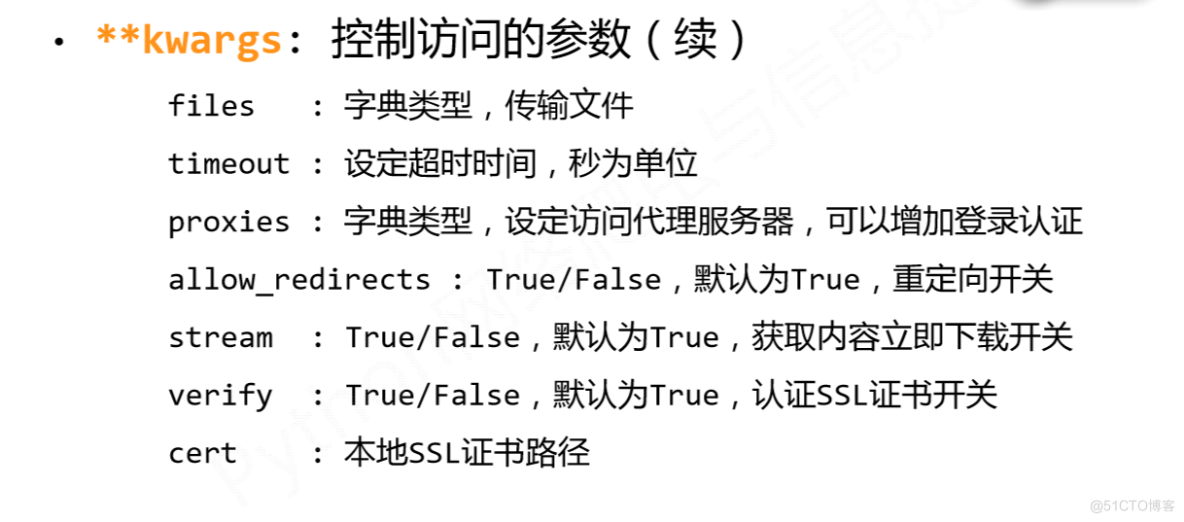
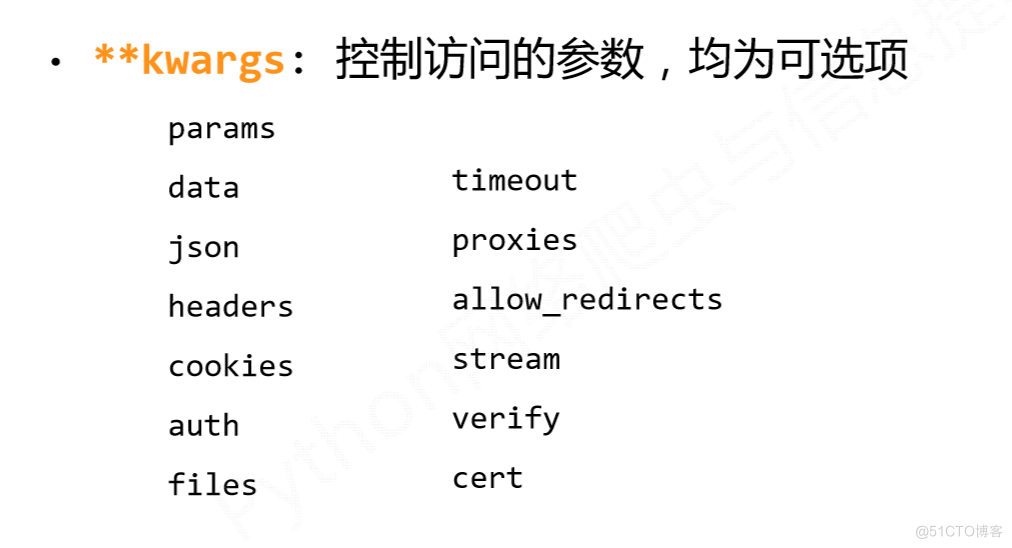
其中timeout,proxies,headers,cookies,verify,是我用到过的东西。
response对象的方法和属性
text属性,属于字符流,获取文字。
content属性,二进制,获取图片,文件等
hashlib
摘要算法简介
Python的hashlib提供了常见的摘要算法,如MD5,SHA1等等。
什么是摘要算法呢?摘要算法又称哈希算法、散列算法。它通过一个函数,把任意长度的数据转换为一个长度固定的数据串(通常用16进制的字符串表示)。
举个例子,你写了一篇文章,内容是一个字符串'how to use python hashlib - by Michael',并附上这篇文章的摘要是'2d73d4f15c0db7f5ecb321b6a65e5d6d'。如果有人篡改了你的文章,并发表为'how to use python hashlib - by Bob',你可以一下子指出Bob篡改了你的文章,因为根据'how to use python hashlib - by Bob'计算出的摘要不同于原始文章的摘要。
可见,摘要算法就是通过摘要函数f()对任意长度的数据data计算出固定长度的摘要digest,目的是为了发现原始数据是否被人篡改过。
摘要算法之所以能指出数据是否被篡改过,就是因为摘要函数是一个单向函数,计算f(data)很容易,但通过digest反推data却非常困难。而且,对原始数据做一个bit的修改,都会导致计算出的摘要完全不同。
def get_MD5(st="alice"):
    md5=hashlib.md5()
    md5.update(st.encode(encoding="utf-8"))
    print(md5.hexdigest())

get_MD5()
爬虫ip和头部处理
def get_html(url):
   headers = {'Accept': '*/*',
               'Accept-Language': 'en-US,en;q=0.8',
               'Cache-Control': 'max-age=0',
               'User-Agent': 'Mozilla/5.0 (X11; Linux x86_64) AppleWebKit/537.36 (KHTML, like Gecko) Chrome/48.0.2564.116 Safari/537.36',
               'Connection': 'keep-alive',
               'Referer': 'http://www.baidu.com/'
               }
    proxy = [
        {'https': 'http://jshkip:jshkip@123.249.47.2:52693511'},
        {'https': 'http://jshkip:jshkip@123.249.47.3:52693511'},
        {'https': 'http://jshkip:jshkip@123.249.47.4:52693511'},
        {'https': 'http://jshkip:jshkip@123.249.47.5:52693511'},
        {'https': 'http://jshkip:jshkip@123.249.47.6:52693511'},
        {'https': 'http://jshkip:jshkip@123.249.47.7:52693511'},
        {'https': 'http://jshkip:jshkip@123.249.47.8:52693511'},
        {'https': 'http://jshkip:jshkip@123.249.47.9:52693511'},
        {'https': 'http://jshkip:jshkip@123.249.47.10:52693511'},
        {'https': 'http://jshkip:jshkip@123.249.47.11:52693511'},
        {'https': 'http://jshkip:jshkip@123.249.47.13:52693511'},
        {'https': 'http://jshkip:jshkip@123.249.47.14:52693511'},
        {'https': 'http://jshkip:jshkip@123.249.47.15:52693511'},
        {'https': 'http://jshkip:jshkip@123.249.47.16:52693511'},
        {'https': 'http://jshkip:jshkip@123.249.47.17:52693511'},
        {'https': 'http://jshkip:jshkip@123.249.47.18:52693511'},
        {'https': 'http://jshkip:jshkip@123.249.47.19:52693511'},
        {'https': 'http://jshkip:jshkip@123.249.47.20:52693511'},
        {'https': 'http://jshkip:jshkip@123.249.47.21:52693511'},
        {'https': 'http://jshkip:jshkip@123.249.47.22:52693511'},
        {'https': 'http://jshkip:jshkip@123.249.47.23:52693511'},
        {'https': 'http://jshkip:jshkip@123.249.47.24:52693511'},
        {'https': 'http://jshkip:jshkip@123.249.47.25:52693511'},
        {'https': 'http://jshkip:jshkip@123.249.47.26:52693511'},
        {'https': 'http://jshkip:jshkip@123.249.47.27:52693511'},
        {'https': 'http://jshkip:jshkip@123.249.47.28:52693511'},
        {'https': 'http://jshkip:jshkip@123.249.47.29:52693511'},
        {'https': 'http://jshkip:jshkip@123.249.47.30:52693511'},
        {'https': 'http://jshkip:jshkip@123.249.47.31:52693511'},
        {'https': 'http://jshkip:jshkip@123.249.47.32:52693511'},
        {'https': 'http://jshkip:jshkip@123.249.47.33:52693511'},
        {'https': 'http://jshkip:jshkip@123.249.47.34:52693511'},
        {'https': 'http://jshkip:jshkip@123.249.47.35:52693511'},
        {'https': 'http://jshkip:jshkip@123.249.47.36:52693511'},
        {'https': 'http://jshkip:jshkip@123.249.47.37:52693511'},
        {'https': 'http://jshkip:jshkip@123.249.47.38:52693511'},
        {'https': 'http://jshkip:jshkip@123.249.47.39:52693511'},
        {'https': 'http://jshkip:jshkip@123.249.47.40:52693511'},
        {'https': 'http://jshkip:jshkip@123.249.47.41:52693511'},
    ]
    pro=random.choice(proxy)
    print(type(pro))
    print(pro)
    res=requests.get(url,headers=head,proxies=pro)
    html=res.text //返回字符串。
    print(html)
    return html
xpath技术
1.0 使用etree的HTML方法获取数据,返回的是一个节点对象
from lxml import etree
html=get_html("https://blog.csdn.net/weixin_44617651/article/details/129746110")
print(html)
page=etree.HTML(html)
print(type(page),page)
xp='//*[@id="mainBox"]/main/div[1]/div/div/div[2]/div[1]/span[2]'
readnum=page.xpath(xp)

for a in readnum:
    print(a.attrib)
    print(a.text)
    print(a.get("class"))
结果如下
{'class': 'read-count'}
阅读数:40927
read-count
本文仅代表作者观点,版权归原创者所有,如需转载请在文中注明来源及作者名字。
免责声明:本文系转载编辑文章,仅作分享之用。如分享内容、图片侵犯到您的版权或非授权发布,请及时与我们联系进行审核处理或删除,您可以发送材料至邮箱:service@tojoy.com